Back to archivecertified generic

Case file — roast review

cadview.cnRoast Review

ShitScore 59 / 100SaaSCaptured 2026-05-17Submitted by communityVisit crime scene ↗

A professional CAD viewer whose "How It Works" section labels three iPad screenshots "iPad Screenshot 1," "iPad Screenshot 2," and "iPad Screenshot 3" — Apple's default App Store Connect placeholder names, shipped to the marketing website unchanged.

CAD FastView is an iOS and Mac app for viewing DWG/DXF engineering drawings. Its hero stat reads "Millions. Professionals worldwide." — a magnitude without a number. Its "How It Works" section features six screenshots; the first three have real captions, the second three are labelled "iPad Screenshot 1," "iPad Screenshot 2," "iPad Screenshot 3." These are the default placeholder names Apple assigns in App Store Connect. Support contact is [email protected], a free Chinese webmail address.

Share this roast

PostShare

Exhibit A — Evidence

Captured 2026-05-17

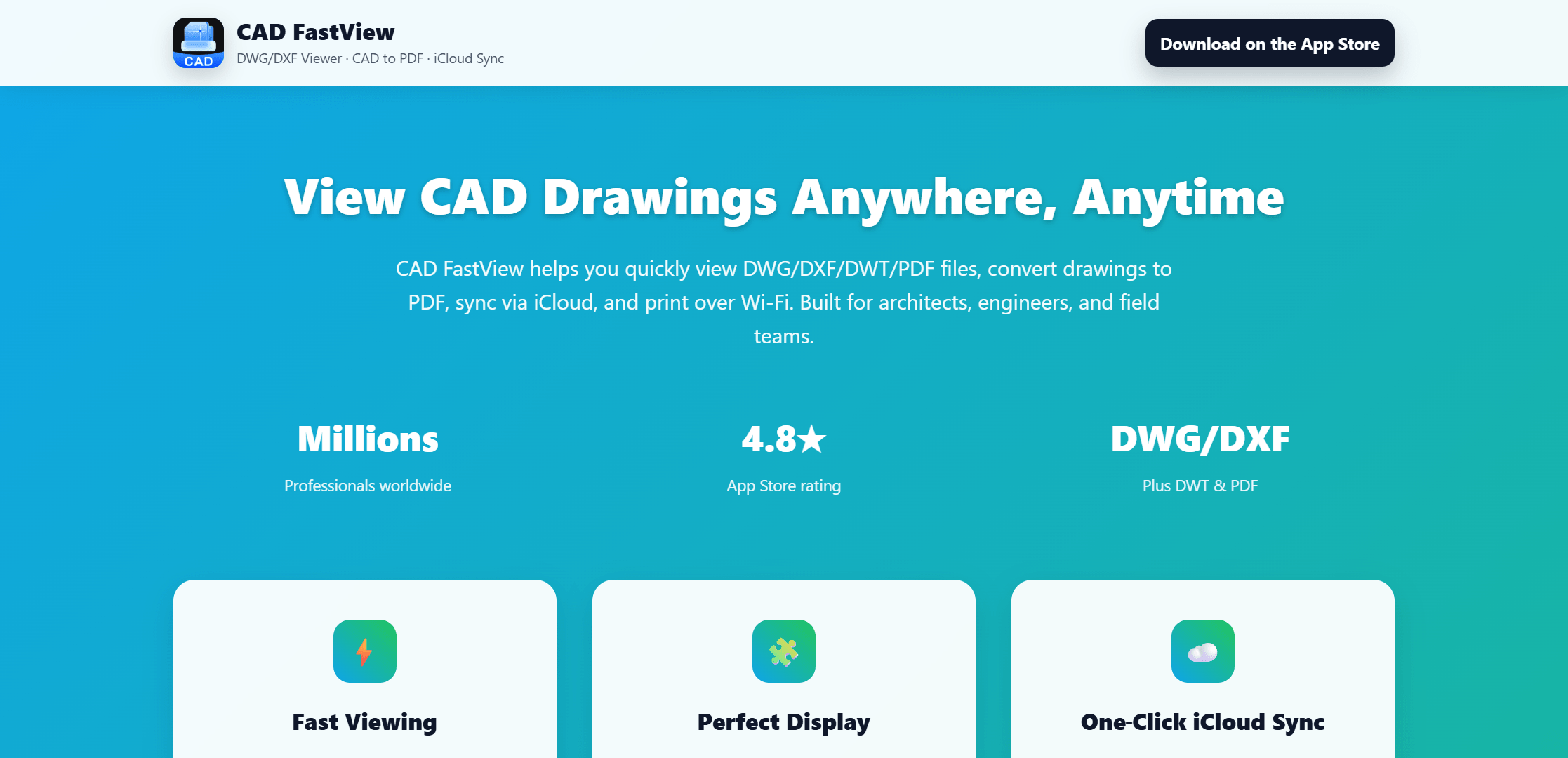
Hero viewport of cadview.cn on a teal-to-green gradient background. Top-left: CAD FastView logo with tagline "DWG/DXF Viewer · CAD to PDF · iCloud Sync." Top-right: black "Download on the App Store" button. Large bold white headline: "View CAD Drawings Anywhere, Anytime." Subtext: "CAD FastView helps you quickly view DWG/DXF/DWT/PDF files, convert drawings to PDF, sync via iCloud, and print over Wi-Fi. Built for architects, engineers, and field teams." Three stats in yellow: "Millions / Professionals worldwide", "4.8★ / App Store rating", "DWG/DXF / Plus DWT & PDF." Six white feature cards below: Fast Viewing, Perfect Display, One-Click iCloud Sync, Convert to PDF, Wi-Fi Printing, Pro Workflow.
Screenshot — cadview.cn (2234×1080)

Score breakdown

Prompt residue6/10
Feature grid density6/10
Meaningless value prop5/10
Trust signal suspicion9/10
Founder face AI probability2/10
Product proof absence7/10
ShipFast resemblance5/10
Hero claim
"View CAD Drawings Anywhere, Anytime." Stats: "Millions / Professionals worldwide", "4.8★ / App Store rating", "DWG/DXF / Plus DWT & PDF."
Proof problem
"Millions" stat has no digit — entirely unverifiable. "4.8★ App Store rating" has no review count displayed. "iPad Screenshot 1/2/3" labels reveal the page was assembled from App Store Connect assets without editorial review. [email protected] is a free consumer webmail — not a domain-matching business email. "More Apps" footer reveals a micro-app portfolio (SwipeSweep, AiHome, Any2PDF) inconsistent with a focused professional product positioning.
Visual pattern
Teal-to-green gradient background → white top bar with logo + "Download on the App Store" button → large bold white headline "View CAD Drawings Anywhere, Anytime" → three yellow stats (Millions, 4.8★, DWG/DXF) → 6 white feature cards (2×3 grid) → "How It Works" section header → 3 iPhone screenshots (Open CAD Files, Convert to PDF, Viewing Options) → 3 iPad screenshots (iPad Screenshot 1, 2, 3) → white CTA card "Built for CAD Work on iOS and Mac" → two buttons (Get CAD FastView for iOS/Mac, View on App Store) → white footer (Product, Legal, Support, More Apps).
Why it still might convert
CAD file viewing on iOS is a genuine professional need — most CAD software is desktop-only and architects and engineers on site need to reference drawings on mobile. The feature set (DWG/DXF/DWT support, iCloud sync, Wi-Fi printing, PDF export) is comprehensive and directly relevant. The App Store listing likely has real reviews that do the trust work the website does not. For a user searching "DWG viewer iOS," this is a functional result with a clear feature set and a free download option.

Editorial roast

By Editorial Desk · Filed against cadview.cn

¶ 01

The "How It Works" section presents six screenshots demonstrating the app's key workflows. The first row is captioned: "Open CAD Files," "Convert to PDF," "Viewing [redacted] Options." The second row is captioned: "iPad Screenshot 1," "iPad Screenshot 2," "iPad Screenshot 3." These are not creative names or minimal-copy design choices. They are the default filenames Apple's App Store Connect assigns when screenshots are uploaded without custom titles. The product named three of its six feature demonstrations after Apple's upload interface.

¶ 02

"Millions. Professionals worldwide." The first hero stat is a magnitude, not a number. Every number above 999 has a magnitude. No product says "Hundreds of happy users" unless the actual count is embarrassing. "Millions" without a digit suggests the real number is either too large to keep current, too round to be credible, or too small to say aloud. It is the largest and least informative quantity available.

A professional CAD viewer whose "How It Works" section labels three iPad screenshots "iPad Screenshot 1," "iPad Screenshot 2," and "iPad Screenshot 3" — Apple's default App Store Connect placeholder names, shipped to the marketing website unchanged.

¶ 03

The support contact in the footer is [email protected]. 163.com is NetEase's free consumer webmail service — the functional equivalent of a Hotmail address. The product is a professional CAD viewer built for architects, engineers, and field teams, invoiced through the App Store, and reachable for support at a free webmail account associated with a Chinese consumer portal.

¶ 04

The footer's "More Apps" column lists SwipeSweep, AiHome, and Any2PDF: PDF Converter. SwipeSweep is, by name, a sweeping or cleaning utility. The developer of a professional CAD viewer targeting construction and engineering also publishes a sweep app and a home AI tool. The portfolio suggests CAD FastView is one of several template-generated micro-apps rather than a focused professional product.

— 30 —

More from the archive

Similar offenders on file.

You are one funnel away from changing the world, and also one funnel away from your own signup form leaking a strangers email address into the placeholder text.

Open file →

Your ideas deserve more views, trusted by 14,000 plus creators worldwide, start for free — the same sticky banner, pinned to the bottom of every single section, saying the exact same thing no matter what you're looking at.

Open file →

An AI-powered tool for escaping AI guesswork — with a last-resort conversion section that tells you to go ask ChatGPT if it's worth buying.

Open file →

Correction channel

Wrong, unfair, or outdated?

Ask for a correction or update. Satire is more effective when the facts are not lazy.